Biometric Access Control Systems: Types, Features, and How They Work
Biometric access control systems use unique physical or behavioral characteristics to verify a person's identity before allowing entry to a building, room, or restricted area.
These systems combine biometric readers, identity verification technology, and electronic security controls to help organizations manage access.
Key Takeaways
Fingerprint, facial, iris, and vein recognition are common biometric access technologies.
Biometric systems can operate independently or alongside access cards and PIN codes.
Accuracy, data protection, user convenience, and backup access methods are important when selecting a system.
Table of Contents
What Is Biometric Access Control?
How Does a Biometric Access Control System Work?
Types of Biometric Access Control Systems
Main Components and Features
Benefits of Biometric Access Control
Common Applications
Security and Privacy Considerations
How to Choose a Biometric Access Control System
Installation and System Integration
Frequently Asked Questions
1. What Is Biometric Access Control?
Biometric access control is an electronic security method that uses measurable human characteristics to confirm a person's identity. Instead of depending only on physical keys, access cards, or passwords, the system examines biometric information before granting entry.
Common biometric identifiers include:
Fingerprint patterns
Facial features
Iris patterns
Palm and finger vein patterns
Hand geometry
Voice characteristics
These systems are used in commercial buildings, manufacturing facilities, corporate offices, research centers, healthcare facilities, and other locations that require controlled entry.
Biometric Access Control vs. Traditional Access Control
Traditional access control generally relies on something a person has or knows, such as a keycard, PIN, or password. Biometric access control uses a person's measurable physical or behavioral characteristics.
Feature | Traditional Access Control | Biometric Access Control |
|---|---|---|
Verification method | Card, key, or PIN | Biometric characteristics |
Credential sharing | Cards and PINs may be shared | Biometric credentials are harder to transfer |
User management | Credential-based | Biometric enrollment |
Common technologies | Keycards and PIN pads | Fingerprint, facial, and iris recognition |
Applications | General building entry | Controlled and restricted areas |
Some organizations combine both approaches to create additional verification layers.
2. How Does a Biometric Access Control System Work?
A biometric access control system follows a sequence of enrollment, scanning, comparison, and access authorization.
Step 1: User Enrollment
An authorized administrator registers a person in the system. The biometric reader captures the required characteristic, such as a fingerprint or facial scan.
Step 2: Biometric Data Processing
The system analyzes the captured information and extracts identifying features. These features are generally converted into a digital biometric template.
Step 3: Identity Verification
When the person approaches a controlled entry point, the reader captures a new biometric sample and compares it with the enrolled information.
Step 4: Access Decision
The access controller evaluates the verification result and checks the person's access permissions.
Approved verification: The system activates the electronic door lock or entry gate.
Unsuccessful verification: Access remains restricted.
Additional verification required: The system may request a PIN, access card, or administrator approval.
Step 5: Activity Recording
Depending on the configuration, the system records entry attempts, access decisions, timestamps, and other security events.
Common Biometric Matching Methods
Biometric systems generally use two matching approaches:
1:1 Verification: The person's biometric sample is compared with a specific enrolled identity.
1:N Identification: The sample is compared against multiple stored templates to identify a possible match.
The appropriate method depends on the facility's access requirements, user volume, and security design.
3. Types of Biometric Access Control Systems
Different biometric technologies have different operating requirements. The right option depends on the environment, expected traffic, user conditions, and security objectives.
Fingerprint Access Control Systems
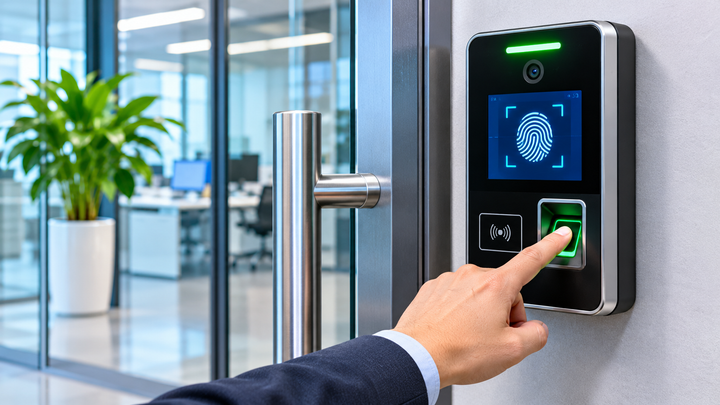
Fingerprint recognition identifies users by examining the unique patterns and features of their fingerprints.
Key Features:
Compact fingerprint readers
Quick enrollment and verification
Integration with electronic door locks
Support for card and PIN verification
Fingerprint access control readers are commonly installed in offices, employee entrances, laboratories, and restricted rooms.
Considerations:
Moisture, dirt, worn fingerprints, or physical work conditions can affect successful scanning. Organizations should consider alternative verification methods for situations where fingerprint recognition is unsuccessful.
Facial Recognition Access Control Systems
Facial recognition systems analyze facial characteristics using cameras and biometric matching technology.
Key Features:
Camera-based identity verification
Contactless access
Support for controlled entry points
Integration with visitor and employee management systems
Facial recognition can be useful in high-traffic buildings where contactless verification is preferred.
Considerations:
Lighting, camera placement, face coverings, and differences in facial characteristics can affect recognition performance. Systems should be evaluated under realistic operating conditions before installation.
Iris Recognition Systems
Iris recognition analyzes the patterns in the colored part of the eye. Specialized imaging equipment captures these patterns for comparison with an enrolled biometric template.
Key Features:
Detailed biometric pattern analysis
Contactless scanning options
Use in controlled and restricted environments
Integration with other identity verification methods
Iris recognition may be considered for facilities with specialized security requirements. Equipment placement, user positioning, and environmental conditions should be evaluated before deployment.
Palm and Vein Recognition Systems
Palm and vein recognition systems identify users through patterns in the hand or veins beneath the skin.
Key Features:
Specialized biometric scanning
Contactless or near-contact operation, depending on the equipment
Integration with electronic access controllers
Potential use in restricted facilities
These systems may suit environments where organizations need alternatives to fingerprint or facial recognition.
Voice Recognition Systems
Voice recognition analyzes characteristics of a person's speech, including patterns associated with their voice.
Voice biometrics can be used in certain authentication applications. However, background noise, voice changes, and recording-based attacks can create practical limitations. Organizations should evaluate whether voice recognition is appropriate for physical building access.
4. Main Components and Features
A complete biometric door access system requires more than a biometric reader. Different hardware and software components work together to manage identity verification and entry permissions.
Component | Main Function |
|---|---|
Biometric reader | Captures fingerprint, facial, iris, or other biometric data |
Access controller | Evaluates permissions and manages access decisions |
Biometric database | Stores enrolled templates and related identity records |
Electronic door lock | Controls physical entry |
Access management platform | Handles users, permissions, and system settings |
Network connection | Connects readers and management equipment |
Monitoring system | Records events and displays access activity |
Backup power | Supports operation during power interruptions |
Important System Features
Liveness Detection
Liveness detection helps determine whether a biometric sample is being presented by a genuine person rather than a photograph, replica, or other artificial representation.
Access Permission Management
Administrators can assign access permissions according to employee roles, locations, and approved schedules.
Audit Trails and Monitoring
Access records help security teams review entry activity and investigate unusual events.
Multi-Factor Authentication
Biometric verification can be combined with an access card or PIN to add another authentication factor.
Centralized Administration
A centralized management platform can help administrators manage multiple readers, doors, and authorized users from one location.
5. Benefits of Biometric Access Control
Biometric access control can improve identity verification and make access management more organized.
Stronger Identity Verification
Biometric characteristics help connect access permissions with an enrolled individual rather than relying exclusively on a transferable card or shared PIN.
Reduced Credential Sharing
Because biometric verification is linked to a person's physical characteristics, it can make unauthorized credential sharing more difficult.
Contactless Entry Options
Facial and some iris recognition systems can verify users without requiring them to touch a reader.
Better Access Management
Administrators can manage individual permissions for different departments, rooms, and restricted areas.
Improved Activity Tracking
Electronic access records can help organizations understand who attempted to enter a particular area and when the event occurred.
Flexible Security Configuration
Biometric readers can be combined with keycards, PIN pads, door sensors, electronic locks, and other security equipment.
6. Common Applications
Biometric access control is used in different environments where identity verification and controlled entry are important.
Corporate Offices
Companies can use fingerprint or facial recognition systems to manage employee access to office entrances, server rooms, and confidential departments.
Manufacturing Facilities
Industrial facilities may install biometric readers at production areas, equipment rooms, and restricted operational zones.
Healthcare Facilities
Hospitals and laboratories can use access control systems to manage entry to medicine storage areas, research rooms, and authorized staff locations.
Data Centers
Data centers may combine biometric verification with access cards, PINs, surveillance cameras, and additional security measures.
Educational Institutions
Schools, universities, and research institutions can use controlled entry systems to manage access to laboratories, administrative areas, and other restricted spaces.
Government and Research Facilities
Facilities that handle sensitive information or specialized equipment may use biometric access control as one layer within a broader security framework.
7. Security and Privacy Considerations
Biometric systems introduce specific security and privacy responsibilities because biometric information is sensitive and cannot be changed as easily as a password.
Protect Biometric Templates
Biometric information should be protected through appropriate encryption, secure storage, access restrictions, and controlled data retention.
Use Liveness Detection
Choose equipment with suitable presentation attack detection capabilities. These features help reduce the risk of unauthorized access attempts using artificial biometric samples.
Review System Accuracy
Two important performance measurements are:
False Acceptance Rate (FAR): The rate at which an unauthorized person is incorrectly accepted.
False Rejection Rate (FRR): The rate at which an authorized person is incorrectly rejected.
Both measurements should be reviewed under realistic operating conditions and across representative user groups.
Provide Alternative Access Methods
A backup process is important when a reader cannot recognize a user because of an injury, physical condition, equipment fault, or environmental issue.
Establish Clear Data Policies
Organizations should define how biometric data is collected, stored, accessed, retained, and deleted. They should also review applicable privacy requirements before deployment.
8. How to Choose a Biometric Access Control System
Selecting a suitable system requires evaluating security objectives, facility conditions, user requirements, and integration needs.
Identify Access Requirements
Determine which areas require restricted entry and how many users need access. A small office may need a different configuration from a large industrial facility.
Compare Biometric Technologies
Review fingerprint, facial, iris, and vein recognition based on accuracy, operating environment, user convenience, and maintenance requirements.
Evaluate Recognition Performance
Request documented performance testing, including false acceptance rates, false rejection rates, and presentation attack detection capabilities.
Check System Integration
Confirm compatibility with existing equipment, such as:
Electronic door locks
Access control panels
CCTV systems
Visitor management platforms
Employee management systems
Security monitoring platforms
Review Data Protection Capabilities
Understand where biometric templates are stored, who can access them, and how the provider protects sensitive information.
Consider Total System Requirements
Compare more than the initial hardware price. Important considerations include:
Biometric reader specifications
Access controller requirements
Installation and wiring
System licensing
Database and network infrastructure
Maintenance requirements
Technical support
Future expansion requirements
Compare Equipment and Providers
When evaluating biometric access control system suppliers, review product specifications, compatibility documentation, warranty terms, technical support, and installation experience.
Compare the complete system rather than choosing equipment based only on advertised features.
9. Installation and System Integration
A well-planned installation helps biometric access control equipment operate consistently.
Typical implementation stages include:
Site Assessment: Identify entry points, door types, network access, electrical requirements, and user traffic.
Equipment Selection: Choose suitable readers, controllers, locks, and management platforms.
Hardware Installation: Mount biometric readers and connect them to the access control equipment.
System Configuration: Set user permissions, access schedules, and security rules.
User Enrollment: Register authorized users and test biometric verification.
Performance Testing: Check recognition reliability, backup entry methods, event logging, and emergency procedures.
Ongoing Maintenance: Review system updates, equipment condition, database permissions, and security records.
Integration With Existing Security Systems
Biometric access control can be integrated with other building security technologies.
For example, an authorized fingerprint scan may trigger an electronic door lock while the central management platform records the event.
Integration with CCTV can also help security teams review relevant entry events. However, the connection between video monitoring and biometric identity records should follow clearly defined access and privacy policies.
10. Frequently Asked Questions
What is the most common type of biometric access control?
Fingerprint and facial recognition are commonly used biometric access methods. The best option depends on the facility, user population, security requirements, and operating environment.
Are biometric access control systems more secure than keycards?
Biometric systems provide a different form of identity verification and can reduce some risks associated with shared or transferred keycards. However, they also introduce biometric data security and recognition risks. Combining biometrics with another authentication factor may provide additional protection.
Can biometric access control work without an internet connection?
Some systems can operate locally using on-site controllers and stored enrollment records. Other systems depend on network connections for centralized management. Offline capabilities should be confirmed before selecting equipment.
How much does a biometric access control system cost?
Pricing varies according to biometric technology, reader quantity, access controllers, installation requirements, management platforms, and integration needs. A complete project assessment provides a more meaningful estimate than comparing individual reader prices.
Can biometric access control be integrated with CCTV?
Yes. Compatible access control platforms can connect with CCTV and video management systems to help security teams review entry events and related footage.
What happens when biometric recognition fails?
The system can follow a configured backup procedure, such as access card verification, PIN entry, or administrator-assisted identity checks. Emergency exit arrangements should also comply with applicable building and fire safety requirements.
Are biometric access control systems suitable for industrial facilities?
They can be suitable for industrial environments when the equipment is designed for actual operating conditions. Dust, moisture, temperature, protective equipment, and heavy user traffic should all be considered when selecting biometric readers.
Conclusion
Biometric access control systems provide organizations with another way to verify identity and manage entry to buildings and restricted areas. Fingerprint, facial, iris, and vein recognition technologies each have different strengths and operating requirements.
A suitable system should balance recognition performance, user convenience, equipment compatibility, data protection, and backup access procedures. Careful evaluation of these factors helps organizations select a biometric access control solution that fits their facility and long-term security requirements.